is a premier consulting company with a proprietary cloud-based network design tool called Continuous Design
Network design platform

Network
optimization
in 2 hours
not 2 months.

Save 38 hours per project. Get client-ready results. For consultants and mid-market supply chain teams who need enterprise-grade optimization without enterprise complexity.

Book a demo Watch 90-sec tour
Built by ex-Deloitte Senior Consultant
Powered by Gurobi (#1 solver)
Northstar Q3 Scenario simulation
LIVE
Scenarios
Baseline
$28.4M
Close ATL
$25.3M
+Reno DC ★
$24.1M
Consolidate
$26.8M
SolverGurobi
PLANT-1 PLANT-2 DC-CHI DC-ATL DC-LAX +RENO OPTIMIZED VIEW
Results
Total Cost
$24.1M
▼ 15.1% vs baseline
Service
97.1%
Capacity
84%
Cost Breakdown
Transport$14.2M
Fixed$6.8M
Variable$3.1M
Export Report
● Solved 1m 38s | 147 lanes · 12 nodes Try live demo →

Our Impact

38 hrs
Time Saved
Per Project
8-10x
ROI
Year 1
2 hrs
Time to Value
vs. 40+ hrs
$0
Setup Fees
or Contracts
What you get

Six capabilities,
one cloud platform.

★ Flagship
01

Scenario simulation engine

Spin up 20+ scenarios in parallel — DC closures, lane changes, demand surges. Compare side-by-side without rebuilding the model. Powered by Gurobi.

20+ scenarios 2s solve Side-by-side
Baseline S1 S2 S3 S4 S5 OPTIMAL
Cost Service
02

Excel → optimization

Drop in your spreadsheet. Columns mapped, data validated, baseline solving in two hours.

2-hour setup
03

1-click reporting

Client-ready PowerPoint and Excel. Charts, maps, and recommendations baked in.

Auto PPT + XLSX
04

Multi-period planning

Model 3–5 years of growth and phased rollouts. The optimizer chooses the timing.

3–5 year horizon
05

Interactive maps

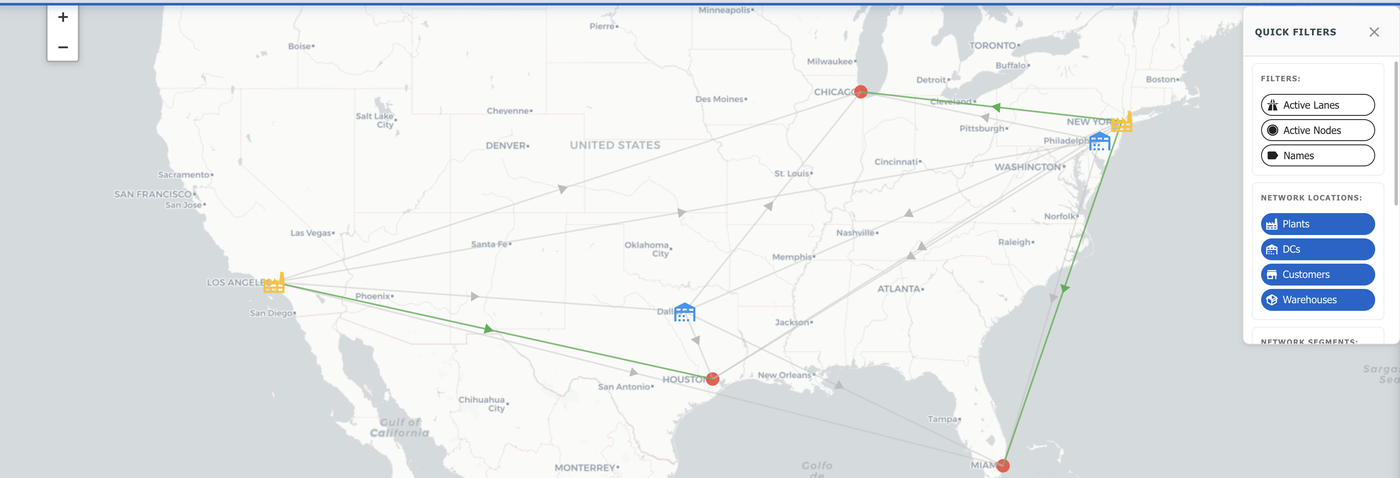
Pan, filter, drill into any node. Lanes, demand heat, utilization — all live.

Live visualization
06

Risk & disruption

Stress-test against port closures, supplier loss, weather. Cost-of-resilience curves.

Resilience curves

Continuous Design in 90 Seconds

See the exact flow your stakeholders care about: Excel → Baseline flows → AI scenarios → Executive-ready exports.

Baseline flows auto-populated AI Advisor cost + service insights One-click PPT & Excel reports
Book a Live Walkthrough →
Trusted by consultants + mid-market operators 38 hours saved per project • 8-10x ROI year one
How It Works

Excel to optimized network.
Three steps. Two hours.

No consultants. No IT. No 6-month implementation. Upload your data and get answers today.

01

Upload Your Excel

Drop in your facilities, lanes, demand, and cost data. The system auto-validates, flags errors, and maps your network onto an interactive map in under 60 seconds.

Drag & drop Auto-validate Instant map
02

Optimize with Gurobi

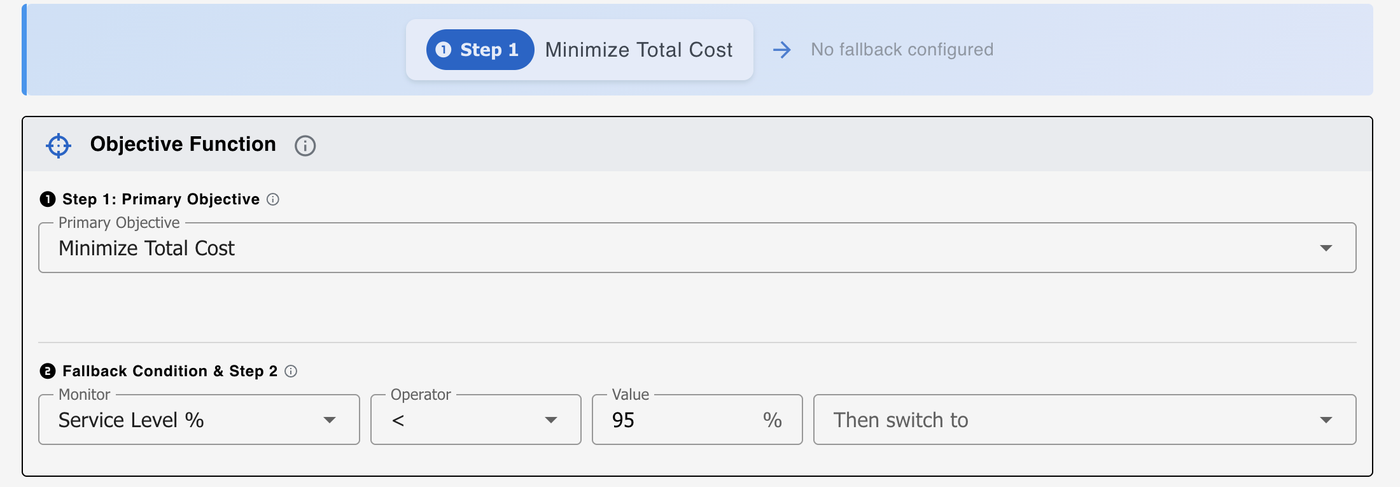
The Gurobi solver evaluates millions of network configurations against 50+ constraint types — capacity, service level, lane restrictions, MOQ — and finds the mathematical optimum in seconds.

50+ constraints 2-sec solve Global optimum
03

Get Client-Ready Reports

One click generates executive PowerPoint decks and Excel exports with cost breakdowns, flow maps, scenario comparisons, and facility-level analytics. Send the link — stakeholders see results instantly.

1-click PPT Excel export Shareable link
The math behind 2 hours

Every step of network design, faster.

We've timed every stage of a typical mid-market network study. Here's where the hours go — and where Continuous Design eliminates them.

See the full methodology
Stage
Typically
Our Tool
Saved
Data gathering & cleanup
12 hrs
1.5 hrs
10.5 hrs
Build optimization model
16 hrs
0.25 hrs
15.75 hrs
Run baseline scenarios
6 hrs
5 min
5.9 hrs
What-if iterations
8 hrs
20 min
7.7 hrs
Sensitivity analysis
4 hrs
5 min
3.9 hrs
Build executive deck
8 hrs
1 click
8.0 hrs
Quality review
2 hrs
0.5 hrs
1.5 hrs
Total
56 hrs
2 hrs
54 hrs saved
Why Choose Us

Fortune 500 consulting expertise
meets modern cloud optimization.

01 — Experience

Proven Experience

Led network optimization for Fortune 500 companies at Deloitte. Then scaled a $1B supply chain as Network Design Lead at Weee!. Consulting rigor meets real-world operational execution.

Meet the team
02 — Speed

Speed & Automation

Traditional network studies take 8-12 weeks and $50K-200K. Continuous Design delivers your first optimization in 20 minutes, unlimited scenarios at 2 seconds each. 40+ hours reduced to 2 hours.

Try the demo
03 — Outcomes

Measurable ROI

10-15% network cost reduction, $2-5M annual impact for mid-size companies. 38 hours saved per project with 8-10x ROI in year one. Data-driven facility location, routing, and capacity decisions.

View use cases
Deloitte
Senior Consultant
Weee!
Network Design Lead
5+ Years
Network Design
8-10x
Year 1 ROI
Software Options for Network Optimization

Three ways to get optimization. One that actually pays back.

Built for consultants and mid-market companies who need enterprise-grade optimization without the enterprise overhead.

Our Approach
Supply Chain Value Creator
$2-6K / month
Same-day setup
Expert support included
Ongoing value + flexibility
8-10x ROI
Typical Year 1 return
Low cost + fast start + automation = high ROI
Enterprise Software
Llamasoft, Optilogic, etc.
5-10x more expensive
6-month implementations
Requires dedicated teams
Steep learning curve
Low ROI
High cost + long delay + no automation = poor ROI
Build Your Own Tool
Hire engineers internally
$250K+ Year 1
12-18 months to build
Ongoing maintenance burden
No automation features
Negative ROI
High build cost + long delay + no automation = negative returns
For Consultants — same pricing as companies
Use our software to deliver faster, better client projects. Monthly licensing means you only pay when you have active engagements.
See detailed cost analysis

See it on your own data in 30 minutes.

Bring a recent network — facilities, lanes, demand. We'll load it, run scenarios, and walk you through the findings live.

Book demo Start free trial

Frequently Asked Questions

Everything you need to know about our network optimization solutions

Why is this 5-10x cheaper than Llamasoft or Optilogic?
Enterprise solutions are built for Fortune 500 companies with massive budgets and IT teams. We built this for mid-market companies who need the same optimization power without the complexity—or the $500K+ price tag.

Cost: $2-6K/month vs. $500K+ annually (5-10x cheaper)
Speed: Same-day setup vs. 6-12 month implementations
Ease: Excel input, 1-click reports vs. dedicated teams required
Support: Ongoing expert help included vs. limited vendor support

Same optimization engine, designed for companies like yours.
How long until I see ROI?
Immediate: You'll save 38 hours on your first project (40 hrs → 2 hrs). At $150/hr analyst rate, that's $5,700 saved immediately.

First Month: Run 2-3 projects in the time it used to take for one. That's $10K-15K in labor savings alone, plus better optimization decisions worth $200K-500K annually.

Year 1: Typical ROI is 8-10x. Software costs $24K-72K/year, you save $200K-500K in network costs + $24K in labor = $224K-524K total value. ROI breaks even after first project.
Can I really set up in 2 hours?
Yes! It's that simple: Click the link → Create your account → Choose your plan and pay → You're done. Start using it immediately. No waiting, no sales calls, no implementation delays. You're up and running in minutes.

Software (Self-Service): Once you've created your account and paid, you can immediately start using the software. Upload 2 Excel files (facilities, demand), configure constraints, and run your first optimization—all in about 2 hours. Training is included (4 hours).

Consulting: 2-week delivery. Week 1: Data gathering and validation. Week 2: Analysis and presentation. You get expert-led recommendations with executive-ready PowerPoints.
Should I start with consulting or software?
Start with consulting if: You need quick wins, have an urgent decision (new DC location), or are new to network optimization.

Start with software if: You run scenarios frequently (quarterly reviews), have internal analysts, or want ongoing optimization capability.

Best value (recommended): Start with consulting for expert-led baseline optimization, then license software for ongoing capability. This delivers quick wins + continuous improvement = maximum ROI.
How do I get my data in?
Easy! Two intuitive Excel files:

1. Input Network Data (your current network): Facilities, transportation lanes, and demand. Export from your ERP/WMS or use our SQL query templates for SAP/Oracle.

2. Input Configuration File (your settings): Costs, constraints, and optimization parameters. Download our template from the Resources page and customize it.

Upload both files—takes about 30 minutes. We provide templates, SQL queries, and step-by-step guides in our Resources section to make it easy.

Still have questions?

Book a Free Consultation
Get started

Bring your network.
Leave with a deck.

30-minute working session on your data. No slides. We model it live.

Book working session